QNAP TS-453A
Photo strip
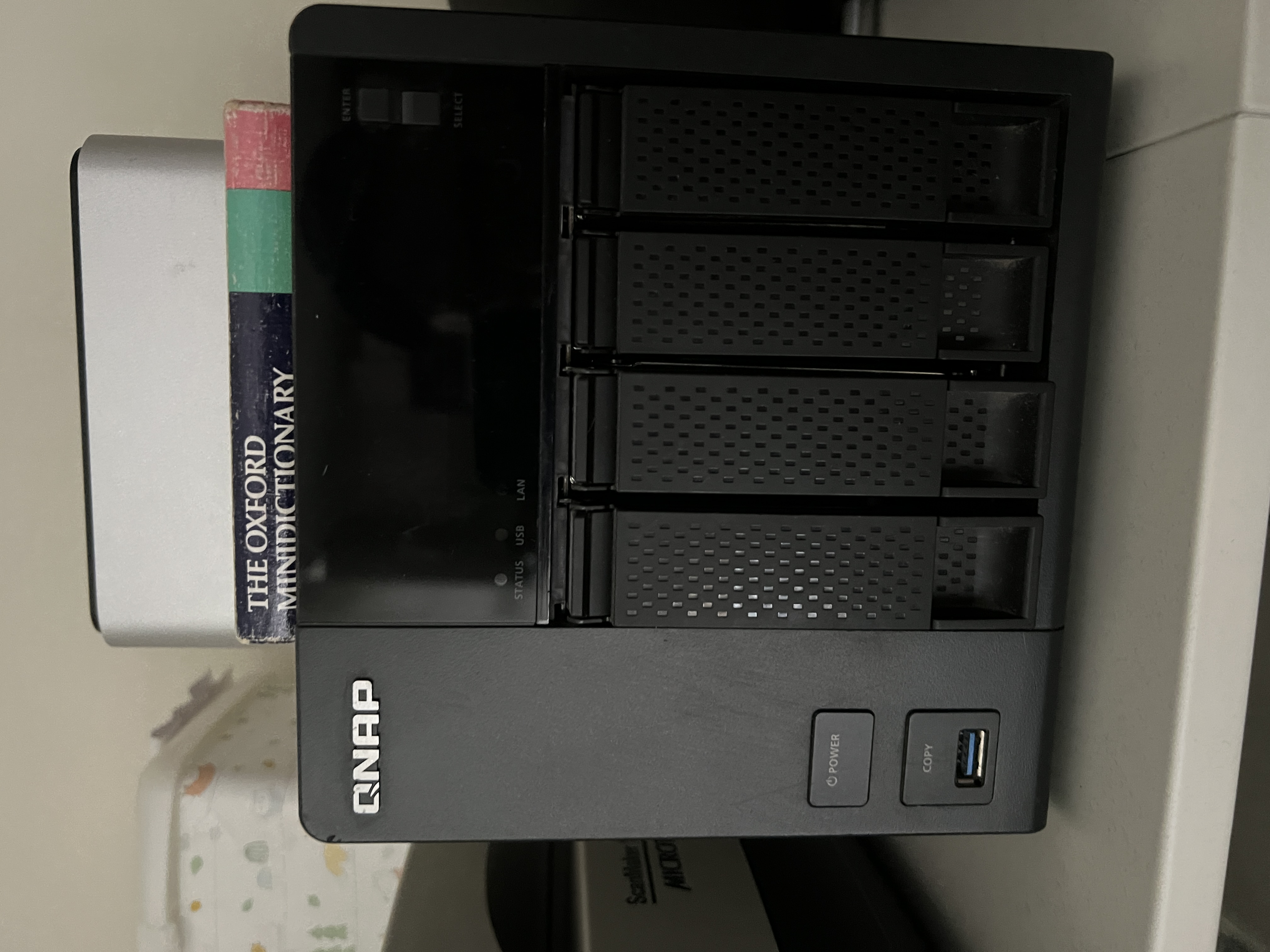
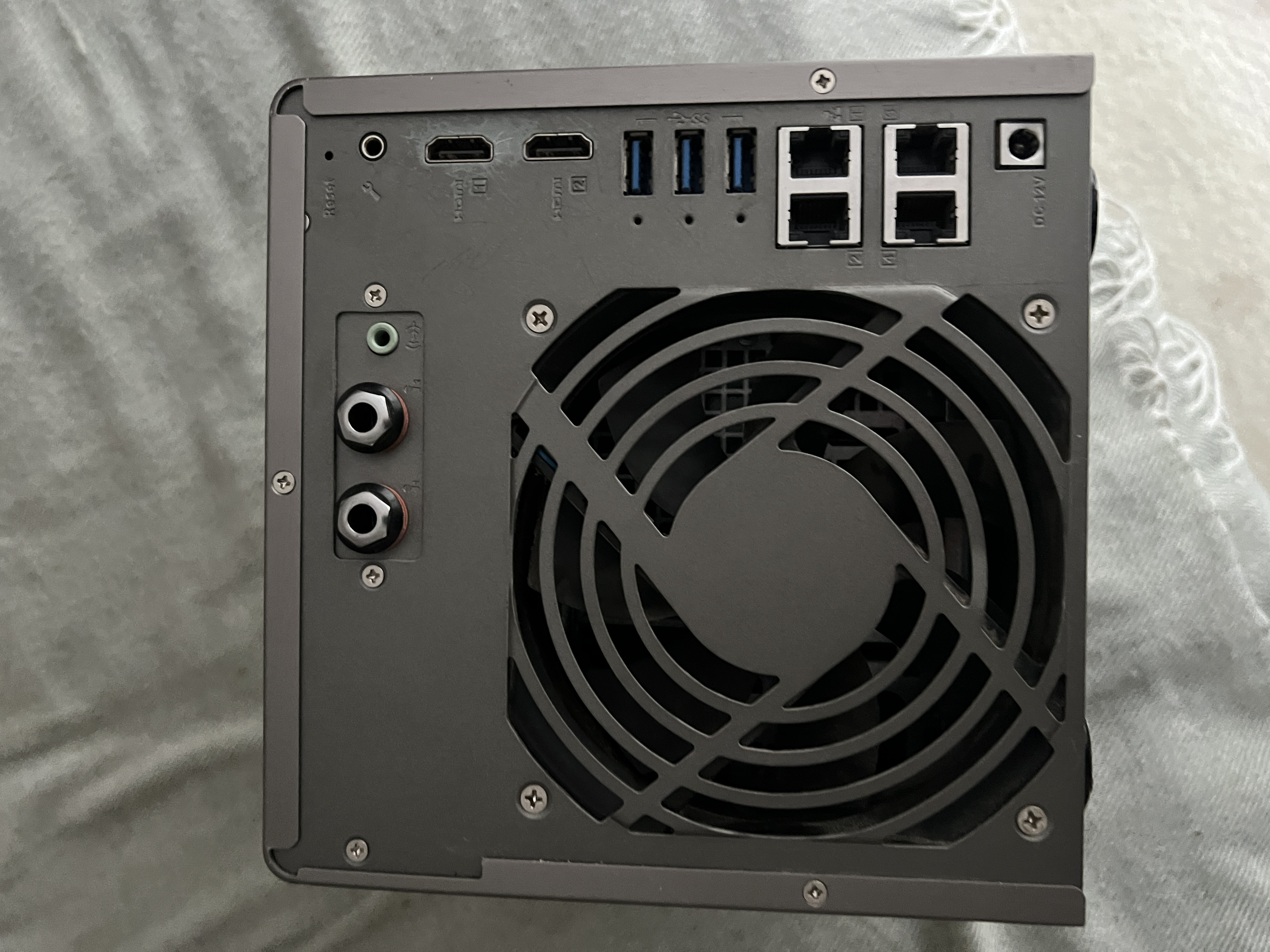
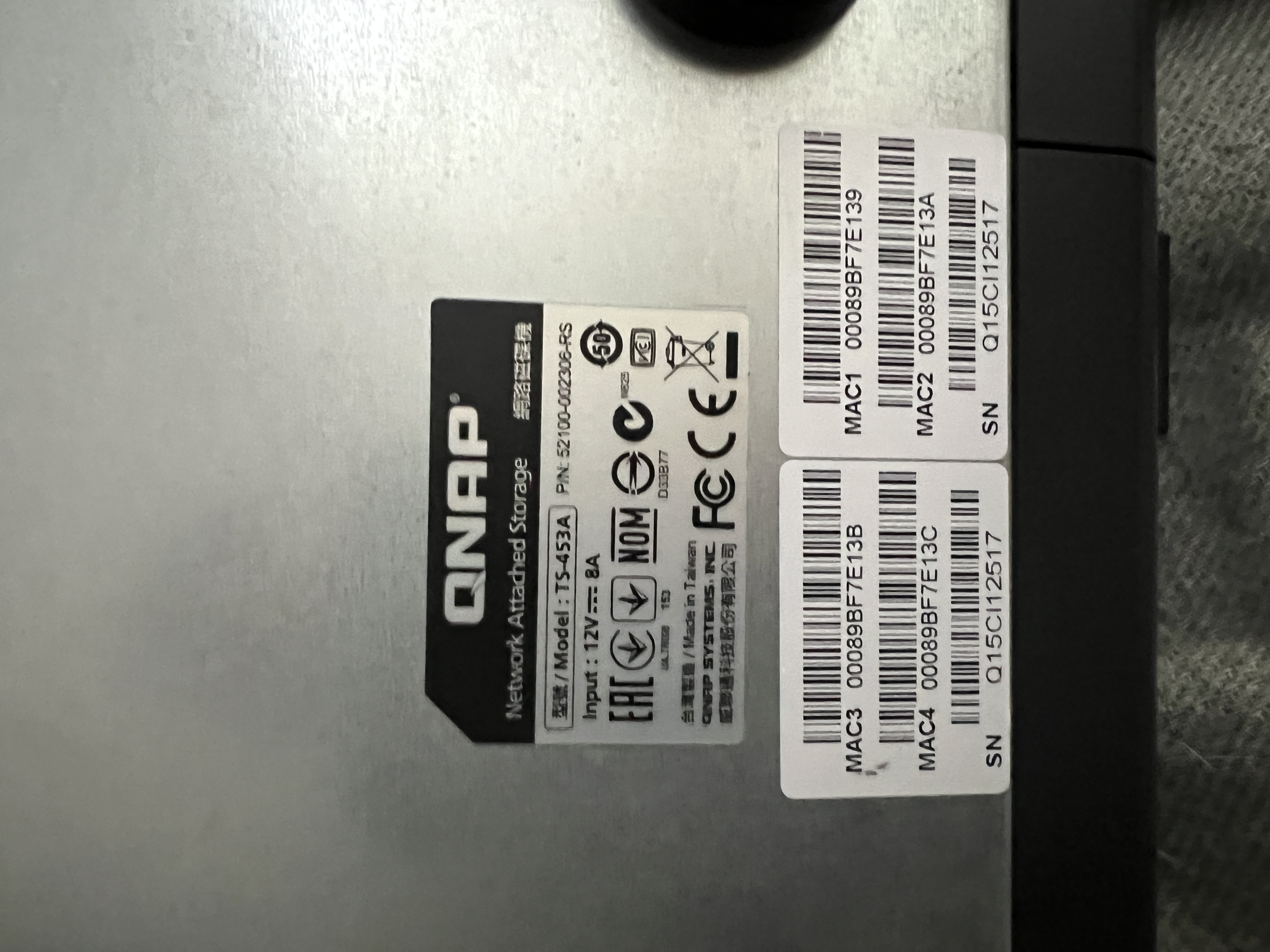
Identity facts
52100-002306-RSQ15CI12517 · "Q15C" prefix consistent with 2015-2016 production00:08:9B:F7:E1:39 ·
MAC2 00:08:9B:F7:E1:3A ·
MAC3 00:08:9B:F7:E1:3B ·
MAC4 00:08:9B:F7:E1:3CSequential range from one factory burn-in. Useful for DHCP reservations + access-control allow-lists.
Full specs · TS-453A
| CPU | Intel Celeron N3150 · quad-core · 1.6 GHz (burst 2.08 GHz) · Braswell · 6 W TDP · AES-NI hardware encryption |
|---|---|
| Memory (stock) | 4 GB DDR3L SO-DIMM (2 × 2 GB) · 1600 MHz |
| Memory (max) | 8 GB (2 × 4 GB) via two SO-DIMM slots |
| Drive bays | 4 × 3.5"/2.5" SATA 6 Gb/s · hot-swappable · lockable trays |
| Max raw capacity | Practically: 4 × 22 TB = 88 TB with current drives. Originally rated 4 × 8 TB = 32 TB. |
| Network | 4 × Gigabit Ethernet (RJ45) · link aggregation / port trunking · failover |
| USB | 3 × USB 3.0 + 2 × USB 2.0 (5 ports total) |
| HDMI | 1 × HDMI 1.4b · 4K (3840×2160) @ 30 Hz · for HD Station media playback |
| IR receiver | Yes · QNAP MCE-compatible remote (sold separately) |
| OLED display | Yes · 128×32 monochrome front-panel display · status + IP + temp |
| File systems | EXT4 (internal) · EXT3/EXT4/NTFS/FAT32/HFS+/exFAT (external) |
| Operating system | QTS (QNAP Turbo NAS Station) · Linux-based |
| Hardware features | Real-time H.264 transcoding · AES-NI encryption · KVM virtualization via Container Station / Virtualization Station |
| Dimensions | 168 × 170 × 226 mm (H × W × D) |
| Weight | ~3.0 kg (without drives) |
| Power supply | External 90 W adapter · 12 V 8 A · single PSU (no redundancy) |
| Fan | 1 × 120 mm rear · smart speed control |
| Launch year | 2016 · positioned as small-business / prosumer 4-bay |
Set-up playbook
Intended role: dedicated backup target for photos.gf.cx — the "2" in a 3-2-1 strategy. Production source → this NAS (on-LAN, versioned, snapshotted) → B2 cloud bucket (off-site, encrypted). This box does not serve end-users; it only ingests, snapshots, and replicates.
Filesystem · btrfs, not ext4
At pool-creation time pick btrfs from the Storage & Snapshots wizard — the default is ext4, do not accept it. btrfs gives block-level checksums (silent bit-rot detection + auto-repair from parity) plus native snapshot support. Schedule monthly Data Scrubbing on the pool. This box does not support QuTS Hero / ZFS — that's TS-h series only — but btrfs is the next-best thing.
RAID · RAID 6, non-negotiable
Four bays in RAID 6 (2 data + 2 parity, ~50% usable). With the 1 GbE bottleneck and modern 12+ TB drives, rebuild after a single failure takes days. RAID 5 + a second drive dying mid-rebuild is the most common way 4-bay NAS lose data. Accept the capacity cost for archive duty.
Drives · recertified enterprise
Sweet spot is recertified datacenter pulls — usually the same silicon as retail NAS-branded drives at half the price, with 2-5 yr seller warranty:
- WD Ultrastar HC520 / HC530 12 TB — ~$110-135 each from ServerPartDeals / GoHardDrive (US) or serverstore.uk (UK). 7200 rpm, helium-filled, CMR.
- Seagate Exos X16 12 TB — same price band, equivalent spec. Buy 2× Ultrastar + 2× Exos so one bad firmware batch can't take all four down at once.
- If you want full new-with-manufacturer warranty: Seagate IronWolf 12 TB (~$180-210) or WD Red Plus 12 TB (~$200-220). Avoid plain "WD Red" — the SMR-shipped-as-CMR branding is tainted.
- Skip shucked externals — markup on WD Elements has narrowed; saving ~$20/drive isn't worth voiding the warranty, dealing with the 3.3 V pin issue, and trusting unknown drive provenance.
Drive burn-in · do not skip
Before deploying any drive (recertified or new):
badblocks -wsv /dev/sdX— destructive write-read-verify, ~3-4 days for 12 TB. Catches infant mortality during the seller's warranty window, not after 20 TB are on it.- Or QTS-native: Storage & Snapshots → Disks → Disk Health → Test → Extended SMART + Full bad-block scan.
- On recertified drives, check SMART
Power_On_Hourson arrival. <30,000 hours is fine; >50,000 hours = RMA immediately (that's 5+ years of 24/7 already on the clock).
Memory upgrade · 4 → 8 GB
Cheap and worth doing: 2× 4 GB DDR3L-1600 SO-DIMM (~£30 / $40). btrfs and snapshot operations are noticeably happier with more RAM, and you'll want headroom for the Tailscale container and rclone/restic running on-box.
Security hardening · mandatory for this generation
TS-453A is in the generation hit by DeadBolt and Qlocker ransomware (2021-22). Treat it as a hardening project, not plug-and-play:
- Never expose to the internet — disable myQNAPcloud public access, UPnP, all port forwarding. For remote access use Tailscale (QTS Container Station package) or WireGuard only.
- Disable everything you're not using — DLNA, Media Server, Photo Station, Qsync, SMB v1, FTP, Telnet.
- Change the admin port from default 8080.
- Disable the default
adminaccount entirely after creating a new admin user with a different name. - Enable 2FA on every account that can log in.
- Keep QTS updated — Security Advisor in QTS flags the obvious stuff.
- Snapshot locking (WORM) — lock daily snapshots for 30+ days so a compromised admin account can't delete them.
Backup architecture · pull, don't push
Configure this NAS to pull from the photos.gf.cx source on a schedule — never the source pushing here. If ransomware compromises the production box, a push-based setup helpfully encrypts your backups too. Pull means the production box holds zero credentials to write into this NAS.
- HBS 3 (Hybrid Backup Sync) — set up an rsync or SFTP pull job from photos.gf.cx's source.
- Or restic running on the QNAP, pulling via SFTP — same outcome with content-addressed deduplication.
Snapshot policy
| Hourly | ×24 · last day of changes for quick "undo" |
|---|---|
| Daily | ×30 · locked / WORM · ransomware-resistant |
| Weekly | ×12 · ~3 months of weekly checkpoints |
| Monthly | ×12 · 1 year of monthly checkpoints |
Off-site leg · B2 via restic or rclone crypt
This NAS-on-LAN is the "2"; the off-site copy is the "1" in 3-2-1. From the NAS, nightly:
- Backblaze B2 — S3-compatible API, ~$6/TB/month storage, with free egress to Cloudflare (Bandwidth Alliance) or free up to 3× stored data/month elsewhere. ~4× cheaper than AWS S3 Standard for this workload.
- restic for deduplicated, versioned, encrypted-on-the-NAS backups (edited file ≠ full re-upload).
- rclone crypt for a simple encrypted mirror (whole-file syncs, no dedup).
- Both encrypt before upload — B2 only ever sees ciphertext. Save the passphrase + salt in 1Password; losing either = data gone.
- Rough cost: 4 TB of photos ≈ $24/month; 10 TB ≈ $60/month.
.key file — but it's QNAP-incompatible and proprietary-format
(restoration needs the same vendor's tool, even via the free "Hyper Backup Explorer"). restic
is open-format and portable — preferred for the off-site leg from this QNAP.
Time Machine on this box (optional secondary role)
TS-453A can serve Time Machine via an SMB share + the per-share "Enable Time Machine support" flag.
Discovery is via Bonjour / mDNS on UDP 5353 — the NAS broadcasts _adisk._tcp
and Macs see it in the destination picker automatically. This is link-local only: Bonjour does not
traverse routers, so a Cloudflare-tunnel hostname like timemachine.gf.cx does not
make the NAS findable. For off-LAN Macs, use Tailscale and manually pin the destination:
sudo tmutil setdestination -a smb://user@nas.tail-scale.ts.net/TimeMachine- Cap the share with a quota (Control Panel → Privilege → Shared Folders → Edit → Quota) — otherwise TM grows until the pool fills before it ever starts pruning oldest backups. Target: 2-3× the Mac's internal disk.
- Exclude bloat at the Mac end:
~/Library/Caches,node_modules, Downloads, VM images, Docker data, iCloud-mirrored Photos libraries.
Approximate build cost
| 4× 12 TB recertified Ultrastar / Exos | ~$450-550 total · ~22 TB usable in RAID 6 |
|---|---|
| 2× 4 GB DDR3L SO-DIMM (RAM upgrade) | ~$30-40 |
| B2 off-site (ongoing) | ~$6/TB/month · 4 TB photos ≈ $24/mo · 10 TB ≈ $60/mo |
| Tailscale | Free tier (up to 100 devices, 3 users) |
| restic / rclone | Free, open source |
Drop zone
Drag in receipts, manuals, SMART reports, config screenshots, firmware update notes, drive labels, anything that should live with this record. Files stay in your browser until you click 📋 Copy JSON for sync and run pa_dropzone_apply.py (or paste the JSON to Claude). Files land in pa/technology/qnap-ts-453a/.
Files archived
- qnap-ts-453a-front-four-bay-tray-array-power-button.jpg · 1.7 MB · hero · four-bay front + power/COPY ports · captured 26 May 2026
- qnap-ts-453a-rear-panel-fan-hdmi-quad-gbe-usb-ports.jpg · 2.1 MB · rear I/O surface · fan, HDMI ×2, USB 3.0 ×3, GbE ×4 · 26 May 2026
- qnap-ts-453a-rating-plate-model-serial-mac-addresses.jpg · 1.6 MB · rating plate · model + P/N + 12V/8A + 4× MAC + S/N · 26 May 2026
Web-sized variants (suffix -web.jpg, ~500 KB each, 2000 px wide) drive the photo strip; click any image for the full-resolution original.
Steward actions outstanding
- Find original receipt — drop in zone above to lock the purchase date + retailer + warranty window.
- Inventory installed drives — model, capacity, age, S/N per bay. Photo of each tray with drive label visible.
- Export SMART reports — Storage & Snapshots → Disks → each drive → SMART Information → export. Drop here.
- Document RAID config — pool name, RAID level, capacity used vs free, snapshot/replication policy. Screenshot the Storage Pool view.
- Capture current QTS version — Control Panel → System → System Information.
- Record network role + DHCP reservation — which IP, which switch port, what services are advertised (SMB, NFS, AFP, etc).
- Track QTS update cadence — note last security update + next migration trigger (when security updates stop).
- Migration target sketch — when EOL hits, what replaces this? (Newer QNAP / Synology / self-built TrueNAS / pure-cloud — depends on workload mix.)
Cross-references
- Synology DS1813+ — the sibling 8-bay enclosure on the same network
- Technology category index
- Migration context: see the Audrey 4TB photo-library + Immich RAID sketch (parked sketch) for the broader "what does the future warm-storage layer look like" conversation